Introduction
Most design workflows don’t actually look like workflows.
They’re a mix of notes, half-finished ideas, tabs left open for later, and a mental list of things you’re trying not to forget. Somehow, projects still move forward, but often with more friction than necessary.
Over time, designers tend to build small systems that bring a bit more clarity to that process. Not rigid structures, but simple ways of organising work so it feels easier to manage.
The challenge is that there isn’t just one way to do it.
Different projects need different levels of structure. Some benefit from clear steps, others need more flexibility. So instead of searching for a single “perfect” workflow, it’s usually more useful to understand a few different systems, and know when to use each one.
Quick Answer: What Are the Best Workflow Systems for Designers?
The best workflow systems for designers are flexible structures that help organise creative work without restricting it.
Common systems include:
- Kanban boards for visual task tracking
- Weekly planning for managing workload
- Time blocking for focused work
- Deep work for uninterrupted creative thinking
- Hybrid systems that combine multiple approaches
Each system supports a different type of work, and most designers end up using a mix rather than relying on just one.
Why Workflow Systems Matter for Designers
Creative work is rarely just about designing.
It involves managing briefs, collecting references, responding to feedback, juggling deadlines, and keeping track of multiple moving parts at once. Without some kind of structure, things can start to feel slightly chaotic.
Not in an obvious way, but in a slower, creeping way where everything becomes a bit harder to manage than it needs to be.
The role of a workflow system isn’t to control the creative process. It’s simply to create enough structure that the work can move forward more easily.
If you’re looking at this more broadly, I’ve written about how designers organise their projects, which breaks this down into a wider system.
1. Kanban Boards (Visual Workflow)
Kanban is one of the most commonly used workflow systems in design.
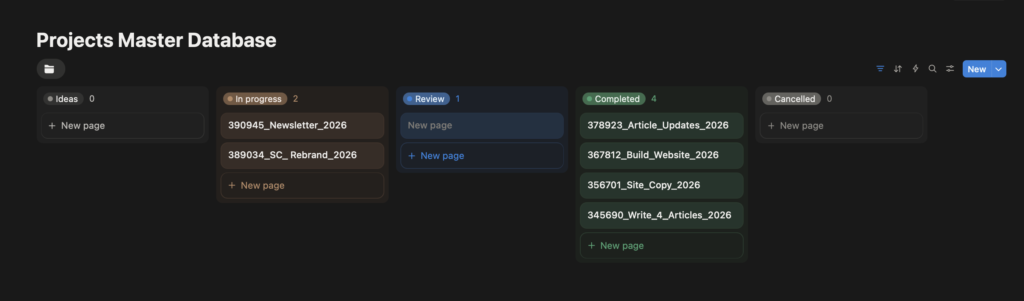
It’s a visual system where tasks move through different stages as the project progresses. A typical structure might look like:

This works particularly well because it reflects how creative work actually unfolds. Not perfectly linear, but still moving forward.
Kanban is especially useful when:
- you’re managing multiple projects
- you need visibility across tasks
- you’re working with a team
- you want to track progress visually
Tools like Notion or ClickUp often use this structure, but it can also be done very simply.
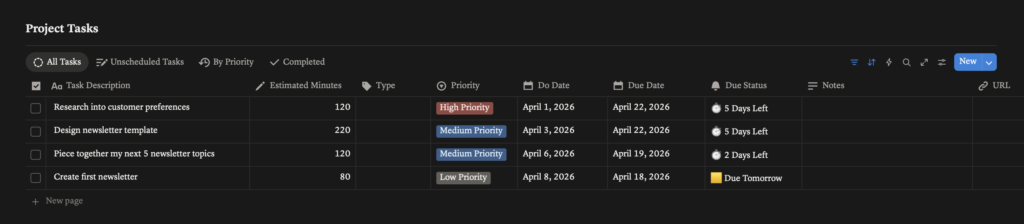
At the moment, I tend to prefer using boards. They feel more visual, which makes everything easier to take in at a glance. Seeing icons, colours, and deadlines grouped together in one place makes the process feel more manageable, and a bit more encouraging to stay on top of things.
That said, I still find lists useful when I’m looking across multiple projects at once. They make it easier to see priorities and deadlines in a more linear way, rather than everything being spread across the page. Luckily with Notion and ClickUp you can view them however suits best for you. This is usually where my workflow starts to overlap with how I organise my life more generally.
2. Weekly Planning (Light Structure, Flexible)
Weekly planning is a much simpler system, but often just as effective.
Instead of focusing on individual tasks, you plan your work at a slightly higher level. At the start of the week, you might outline key priorities, assign rough time to projects, and decide what needs to be completed.
This works well because it gives you direction without over-structuring everything.
It’s particularly useful when:
- your workload changes frequently
- you’re balancing multiple projects
- you don’t want to track every small task
It creates a sense of control, without becoming overwhelming.
Alongside my project planners, I also use a weekly planner, although I don’t rely on it consistently for project work.
Most of my projects are quite task-based, with specific deadlines and clear requirements, so I tend to manage them more directly through boards or task lists.
Where the weekly planner becomes more useful is in my personal life. It helps me get a clearer sense of how much I actually have on in a given week, and I’ll usually include key work deadlines and working hours there as well.
It’s a simple way to avoid overcommitting, especially when everything starts to overlap.
3. Time Blocking (Focused Work Periods)
Time blocking is a more structured approach.
Instead of working from a task list, you assign specific blocks of time to specific types of work. For example:
9–11 → concept work
11–1 → design development
2–4 → feedback and revisions
This can be particularly useful for design work that requires focus. Rather than constantly switching between tasks, you create space for deeper thinking.
Time blocking works well when:
- you need uninterrupted focus
- you struggle with distractions
- you want to structure your day more intentionally
Time blocking is often one of my favourite ways to organise my day. It helps create focus and stops everything from feeling too overwhelming.
I tend to give more time to larger or more important tasks, and usually schedule them earlier in the day. It means I can approach them with more energy, and it removes that sense of them hanging over everything else.
4. Deep Work (Protecting Creative Focus)
Deep work isn’t a tool or system in the traditional sense. It’s more of a mindset.
The idea is to create uninterrupted time where you can focus fully on complex or creative work. No notifications, no switching tasks, no quick checks. Just focused work.
For designers, this is often where the best ideas happen. But it’s also one of the hardest things to protect.
Deep work works best when:
- you’re working on concepts or problem-solving
- you need sustained focus
- you’re trying to push ideas further
I’ve noticed I tend to work best either first thing in the morning or later in the day. That mid-afternoon point is usually where I shift into what I think of as “softer” tasks, things like research or lighter refinements.
In the morning, my focus feels much clearer. Then later in the day, ideas seem to flow more naturally. Learning to recognise that rhythm has made a noticeable difference to how I structure my time.
5. Hybrid Systems (What Most Designers Actually Use)
In reality, most designers don’t use just one system. They combine a few.
For example:
- a Kanban board for tracking tasks
- weekly planning for priorities
- time blocks for focused work
This creates a system that’s structured enough to stay organised, but flexible enough to adapt.
I think this is where most workflows naturally end up. Not perfectly defined, but evolving over time. Most designers end up combining a few systems like this, which is something I’ve explored more in how I organise my own creative work.
How to Choose the Right Workflow System
If you’re trying to improve your workflow, it’s easy to overcomplicate things.
A simpler approach is:
- start with one system
- use it consistently
- adjust based on what works
Different types of work need different structures. The goal isn’t to find the “best” system, it’s to find something that supports how you think and work.
Why Simpler Systems Tend to Work Better
One pattern that shows up across most designers is that overly complicated systems rarely last.
They might work for a while, but eventually become too much to maintain.
Creative work is unpredictable. Projects shift, feedback changes direction, and timelines move. Systems that are too rigid tend to break under that pressure.
Simpler systems tend to work better because they are:
- flexible
- easy to maintain
- quick to return to
- realistic to use every day
Final Thoughts
I don’t think there’s a single workflow system that works for every designer.
Most people develop their approach gradually, refining things based on what works and what doesn’t. That’s definitely been the case for me.
At the moment, my workflow is less about following a strict system, and more about using a few simple structures that help things feel manageable.
And that seems to be enough.
If you’re exploring this further, I’ve also written about the tools designers use to stay organised and how designers organise their projects, which show how these systems work in practice.
Leave a Reply