
Creative work often looks effortless once it’s finished. A design might appear clean, simple, and intentional, as though the idea arrived fully formed and everything fell into place naturally. Sometimes I even find myself asking… why didn’t I think of that?
But anyone who has worked on design projects knows the reality is usually very different.
Behind most finished pieces of work are evolving briefs, scattered ideas, feedback from several people, and a constant stream of files, references, and revisions. Sometimes it honestly feels like a small miracle when everything finally comes together. Hurrah.
Over time I’ve realised that staying organised isn’t about becoming a perfectly structured person. I’m definitely not the most naturally organised designer myself. But I do need things around me to feel organised. Otherwise that quiet “control” side many designers seem to have starts to panic a little.
And when projects feel messy, creative thinking usually follows pretty quickly.
Most designers eventually build their own systems. They’re not always particularly formal, and they definitely change over time, but they help keep projects moving without losing track of ideas along the way.
In this article, I’ll explore how designers organise their projects, and the kinds of systems that seem to support creative work rather than restrict it.
How Designers Organise Their Projects (Quick Answer)
Most designers organise their projects using a few simple systems that sit around the work itself.
Usually some combination of:
- a clear project brief
- a place to collect inspiration and references
- a way to track tasks and progress
- an organised file structure
- some way of managing feedback
None of these are particularly complicated on their own. It’s more that, together, they stop everything from feeling completely chaotic.
Starting With the Brief
Almost every design project begins with some form of brief. Hopefully a well executed one. And sometimes… one you end up creating yourself.
Sometimes it arrives as a structured document. Other times it starts as a conversation, a few messages, and then a note that slowly grows into something more usable.
Either way, the brief becomes the foundation of the project.
I’ve learned (mostly the hard way) that keeping the brief easy to access saves a lot of confusion later on. Once feedback starts coming in and ideas begin to shift, it’s surprisingly easy to forget what the project was actually meant to do in the first place.
Designers like Massimo Vignelli often talked about understanding the problem before trying to solve it. In many ways, the brief is where that understanding starts.
For example, on a branding project, this might just mean keeping the goal, audience, deliverables, and timeline in one place from the beginning — nothing fancy, just clear.
A typical brief might include:
- the goal of the project
- final deliverables
- deadlines or milestones
- brand references or guidelines
- notes from early discussions
It’s simple, but having it all in one place avoids that familiar situation of searching through old emails trying to piece everything back together.
Collecting Inspiration and References
Before moving into detailed design work, most designers spend some time collecting references and inspiration.
This is usually where things start to feel a bit more interesting.
References might include:
- typography inspiration
- layout examples
- colour palettes
- photography styles
- branding references
Recently, during a branding course, I heard an idea that stuck with me. Instead of immediately looking outward for inspiration, start by sketching your own ideas first. Just pen and paper, seeing what comes out before researching anything else.
The idea is that it keeps the outcome more original.
It’s quite similar to what Austin Kleon talks about – that collecting ideas is important, but the real value comes from how you interpret and combine them.
I’ll be honest though, this doesn’t always work for me.
Sometimes I sit there staring at a blank page thinking… nothing is happening here.
When time is tight, I still find it much easier to build a simple moodboard and start pulling references together. Seeing everything side by side often reveals patterns or directions that aren’t obvious when everything is scattered across different tabs.
It also makes it much easier to talk to clients. Instead of trying to explain a direction, you can show it.
Sometimes I even ask clients to share references themselves. It’s not always perfect, but it usually gives a clearer sense of what they’re drawn to.
Breaking Projects Into Smaller Tasks
Once the direction becomes clearer, the next step is usually breaking the work into smaller pieces.
Large creative projects can feel slightly overwhelming when you look at them as one big thing. Especially when you’re not entirely sure where to start.
Breaking them down makes everything feel more doable.
Instead of thinking about “design the entire campaign”, it becomes something more like:
- exploring early concepts
- experimenting with typography
- creating a first draft
- preparing work for review
- refining based on feedback
As someone who occasionally struggles with time management, this has been one of the most useful shifts for me.
Otherwise I tend to sit there thinking about the whole project at once… and not actually starting anything.
Visual Task Boards
Many designers keep track of these steps using visual task boards.
The idea is simple. Tasks move through stages as the project progresses.
Something like:

What I like about this is that it reflects how creative work actually feels. Not perfectly linear, but still moving forward in some kind of direction.
Even when things get a bit messy (which they usually do), seeing tasks move across a board gives a small sense of progress.
Even when I’m working on my own, this kind of structure helps more than I expect it to.
If you’re thinking more about tools specifically, I’ve written a separate piece on the tools designers use to stay organised, and how they fit into different workflows.
Keeping Design Files Organised
Alongside ideas and tasks, designers also need a way to manage files.
And as anyone who has worked on design projects knows, the number of files grows very quickly.
Create, export, test, import, resize… and suddenly you’ve got 20 versions of the same thing.
I think most designers have had folders full of files named something like “Test_1” through to “Test_60”… and then no idea which one is actually the final version.
Without some kind of structure, finding the right file later can become frustrating very quickly.
A simple setup might look like:
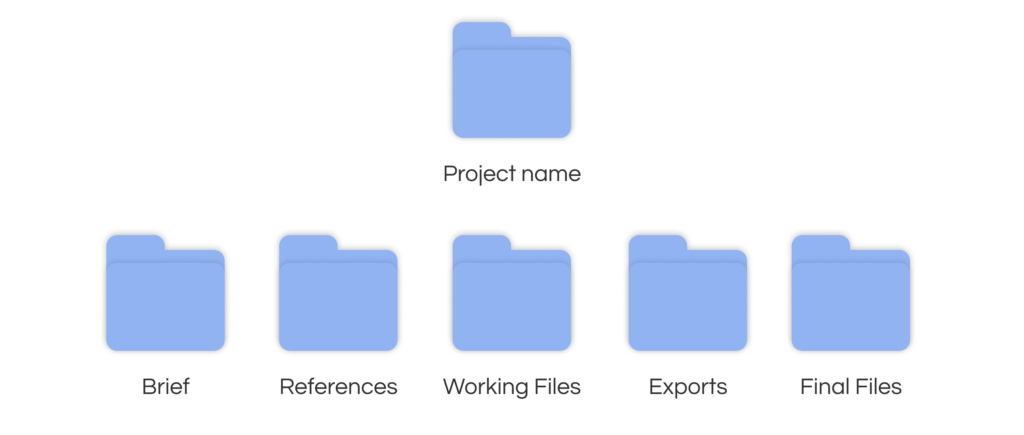
It’s not particularly sophisticated, but it works.
For a while, I experimented with building my own system using an Excel spreadsheet. It would generate project folder names automatically by combining the client name, project type, and year, along with a unique number.
It sounds slightly over the top, but it actually made things much easier to search later on.
For example:
ClientName_ProjectType_Year_ProjectNumber
Acme_Website_2024_017
More recently, I’ve started organising the workflow around projects using ClickUp.
The files themselves still live in folders or tools like Google Drive or Figma. But ClickUp sits around that and connects everything together.
For example, a single task might include:
- the brief
- links to design files
- feedback and comments
- revision notes
- deadlines and status
Instead of jumping between folders, emails, and notes, everything related to that piece of work sits in one place.
I wouldn’t say it replaces anything completely. It just makes the whole process feel a bit more connected.
Why Organisation Helps Creativity
Organisation is sometimes seen as the opposite of creativity. But in practice, the two tend to support each other.
When projects, tasks, and files are organised clearly, there’s less time spent searching for things or trying to figure out what’s going on.
That space can instead be used for thinking, experimenting, and refining ideas.
People like Tiago Forte talk about building external systems to support thinking. The idea being that when information is organised outside your head, you have more mental space to focus on the work itself.
The goal isn’t to build a perfect system.
Just something that removes enough friction so you can actually get on with the creative part.
Final Thoughts
Every designer seems to develop their own way of organising projects over time.
Some prefer structured systems. Others keep things intentionally simple. Most sit somewhere in the middle, adjusting things as they go.
What matters most isn’t the exact tools or setup, but whether it makes your work feel clearer and easier to manage.
If you’re trying to improve how you organise your projects, it might be enough to start small:
- keep your brief in one place
- break your work into visible steps
- organise your files clearly
- and only introduce tools if they actually help
Most systems don’t need to be perfect.
They just need to support how you think and create.
Studio Celeste will continue exploring tools, workflows, and systems in this way — not as perfect solutions, but as evolving approaches that make creative work feel a little more intentional.
Leave a Reply