
Introduction
Naturally, I’m not the most organised person. But I do need things around me to feel organised, otherwise that quiet “control” side many designers have starts to slip, and everything becomes harder to manage.
Designers often sit between two instincts. There’s the creative, free flowing side that explores ideas, and then there’s the part that wants structure and clarity. The challenge is finding some kind of balance between the two.
When that balance is there, work tends to feel easier. When it’s not, even simple projects can start to feel more complicated than they need to be.
Creative work rarely follows a neat, predictable process. From the outside, a finished design can look simple and resolved, but the path that leads there is usually much less tidy.
Projects involve evolving briefs, scattered ideas, feedback arriving from different directions, and a steady stream of files, references, and revisions. Even relatively small projects can become complex once several people are involved. Sometimes there are too many cooks in the kitchen, which doesn’t always help, but it’s part of the process.
Over time, I’ve become more interested in the small systems that help bring a bit of structure to this. Not rigid productivity methods, but practical tools that make creative work easier to manage.
Having worked both in house and as a freelancer, I’ve noticed that while every designer develops their own way of working, certain tools appear repeatedly across creative teams and workflows.
They don’t solve everything, but they do make things feel clearer.
Quick Answer, Tools Designers Use to Stay Organised
Designers use a combination of tools to stay organised, usually including:
- digital workspaces for storing information
- task boards for managing projects
- visual tools for creative exploration
- structured file systems for storing work
These tools don’t replace the creative process, they support it by reducing friction and keeping projects manageable.
A Simple System (At a Glance)
Before getting into specific tools, this is roughly how these pieces fit together:

Each tool tends to support one part of this flow, rather than trying to do everything.
Digital Workspaces for Collecting Ideas and Information
One of the most common challenges in creative work is simply keeping track of information.
We’re designers, not always natural administrators, so it’s fair to say this is where things can start to slip.
Design projects generate a lot of material:
- project briefs
- reference images
- research notes
- feedback from collaborators
- links to inspiration
- and usually a few slightly nonsensical notes from your phone that made perfect sense at the time
Without a central place to organise these things, everything quickly becomes scattered across emails, chat messages, documents, and folders.
I sometimes think of these as self made silos, digital clutter that builds slowly and then becomes frustrating when you actually need something.
To manage this, many designers use digital workspaces to bring everything into one place.
For me, this is where tools like Notion have been the most useful.
Not because they do anything particularly complex, but because they allow everything related to a project to sit together in one space.
A simple Notion project workspace might include
- the original brief
- visual references
- meeting notes
- task lists
- links to design files
Instead of jumping between tools, everything connected to a project lives in one place.
It’s a small shift, but it removes a surprising amount of friction, especially when you’re trying to stay focused.
It also changes how you think about organisation slightly. Rather than storing information in different places, you start to build a single, connected view of the project.
If you’re thinking about this more from a workflow perspective, I’ve broken this down further in how designers organise their projects, which looks at how these pieces fit together more fully.
Task Boards for Managing Projects
While digital workspaces are helpful for collecting information, designers also need a way to track progress.
Most projects involve multiple stages, and often several projects running at once. It becomes very easy to lose track of where things are.
This is where task boards come in.
Interestingly, this is something Notion can also handle, depending on how you set it up.
A simple board might look like:

Tasks move across the board as the project develops.
What I like about this approach is that it reflects how creative work actually unfolds. Not perfectly linear, but still moving forward.
That said, I don’t always use this in a strict way. Sometimes a simple list is enough.
Which is probably the point. The tool is flexible, but the structure stays simple.
These kinds of boards make it easier to:
- see what stage work is in
- keep track of multiple projects
- avoid relying on memory
Even a lightweight version of this can make a noticeable difference.
Visual Tools for Early Creative Thinking
Not every stage of a design project benefits from structure.
In the early phases, exploration is usually more important than organisation.
This is where the more intuitive side of design takes over.
Designers often need space to:
- gather references
- sketch ideas
- test directions
Visual tools support this by providing open canvases where ideas can sit together more freely.
They function almost like a digital studio wall, a place where references, concepts, and fragments of ideas start to build into something more defined.
For example, a project board might include:
- reference imagery
- typography ideas
- colour palettes
- early concepts
Seeing everything together often reveals patterns that aren’t obvious when looking at things individually.
These tools aren’t about strict organisation. They’re about helping ideas take shape.
File Organisation Still Matters
Even with more flexible tools like Notion, one of the simplest forms of organisation still matters, keeping files organised.
Design projects produce a large number of files:
- working documents
- exported assets
- drafts and variations
And it doesn’t take long for things to become slightly chaotic.
I think most designers have had that moment where you’re searching for a file called something like “final_v3” and hoping it’s actually the final version.
A simple structure might look like:
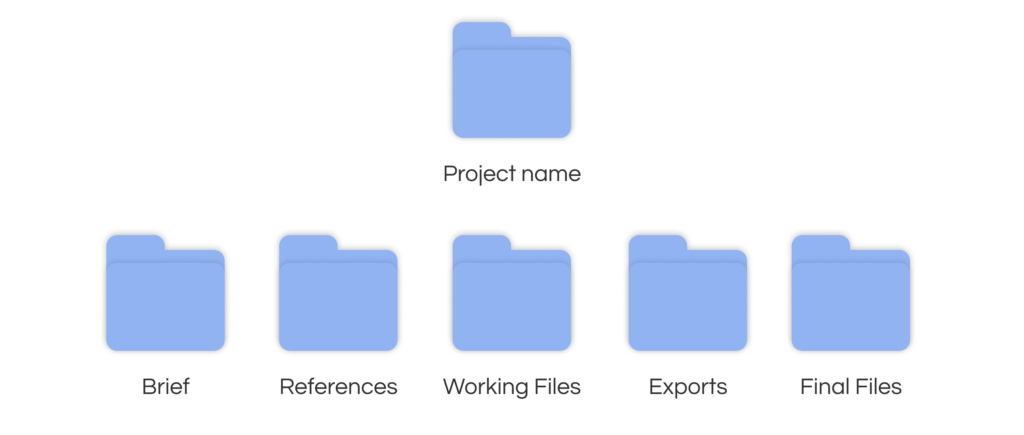
It’s not particularly sophisticated, but that’s usually why it works.
The simpler the system, the more likely you are to stick to it.
Why Simpler Systems Tend to Work Better
One pattern I’ve noticed across different teams is that overly complicated systems rarely last.
Creative work is unpredictable. Projects shift, feedback changes direction, and timelines move.
Systems that try to control everything often become difficult to maintain.
I’ve tried more complex setups before, and they usually start well, then slowly get abandoned.
Simpler systems tend to work better because they are:
- flexible
- visual
- easy to maintain
- realistic to use every day
Rather than relying on one tool to do everything, most designers combine a few that support different parts of the process.
If you’re exploring this more personally, I’ve written about how I organise my creative work right now, which shows how these systems come together in practice.
Organisation as a Support for Creativity
Organisation is sometimes seen as the opposite of creativity, but in practice the two tend to support each other.
When projects, tasks, and files are structured clearly, less energy is spent managing the process, and more can go into the work itself.
The goal isn’t to build rigid systems. It’s simply to create enough structure that creative work can happen without constantly feeling chaotic.
Final Thoughts
Every designer eventually develops their own way of staying organised.
The tools mentioned here are simply some of the ones that appear most often across different workflows.
What matters most isn’t the tools themselves, but the clarity they bring.
For me, tools like Notion have been useful not because they replace other parts of the workflow, but because they bring them together. And often, that’s the part that makes the biggest difference.
Studio Celeste will continue exploring tools, systems, and workflows in this way, not as perfect solutions, but as evolving approaches that support creative work.