Introduction
AI is starting to feel like it sits quietly in the background of almost everything now.
Not in a dramatic, “everything has changed overnight” kind of way, but in smaller, more subtle ways. It shows up in tools, workflows, and processes, often without you really noticing it at first.
At a few of the talks I’ve been to recently, one idea kept coming up in different forms. AI isn’t really a separate tool anymore, it’s becoming part of the environment we work within. And I think that’s probably the most useful way to think about it.
Not as something you either fully adopt or completely ignore, but as something you gradually integrate into parts of your workflow where it actually helps.
This is how I’m currently using AI in my design workflow. Not as a complete system, but as a set of small tools that support different stages of the process.
Quick Answer: How I Use AI in My Workflow
At the moment, I use AI across a few key parts of my workflow, mainly around starting projects, exploring ideas, creating mockups, organising information, and speeding up smaller tasks.
It doesn’t replace the creative work itself. Instead, it helps reduce friction around it, making certain stages feel smoother and easier to move through.
Where AI Fits Into My Workflow
One of the more useful ideas I’ve heard recently is that AI isn’t really about replacing workflows, but about sitting around them.
It doesn’t need to take over everything. It just needs to support the parts that tend to slow things down.
That’s been the most helpful way for me to approach it. Not as a full system, but as something that fits into specific moments where it actually makes a difference.
If you’re thinking about this more broadly, I’ve written about workflow systems for designers, which breaks down how structure fits into creative work more generally.
1. Starting Projects and Exploring Ideas
I remember the first time I used AI to start a project. We’re quite heavily encouraged to use it within my team, and I was definitely sceptical at first. It felt like something that might interrupt the creative process rather than support it.
But over time, I’ve found it genuinely useful. Not in a way that replaces ideas, but in a way that helps me get moving when a project still feels slightly unclear.
It’s helped me research faster, refine ideas more clearly, and structure early thinking in a way that makes starting feel less overwhelming. Sometimes that’s all you need. Just something to react to, rather than starting from nothing.
When I first tried AI to create visuals, I remember thinking… well, that’s my job secured then.
But the more I learned about it, the more I realised it felt less like a replacement and more like an accelerator. It allows me to work quicker, explore ideas faster, and spend more time refining the parts of the process that still need human judgement.
Now, I’m not naive to how much AI will change certain roles and more manual parts of creative work. That shift is already happening in a lot of industries. But for some of us, it’s become far more useful as a support tool than something replacing the creative process entirely.
2. Using AI for Mockups and Visual Exploration
This is probably where I’ve noticed the biggest shift in my own workflow.
More recently, I’ve been using AI for mockups, which has been a noticeable upgrade in how I explore ideas. They’re still my ideas, AI just helps visualise them more quickly.
It’s not the end product, but it allows me to test multiple versions before committing the time to refine a single direction.
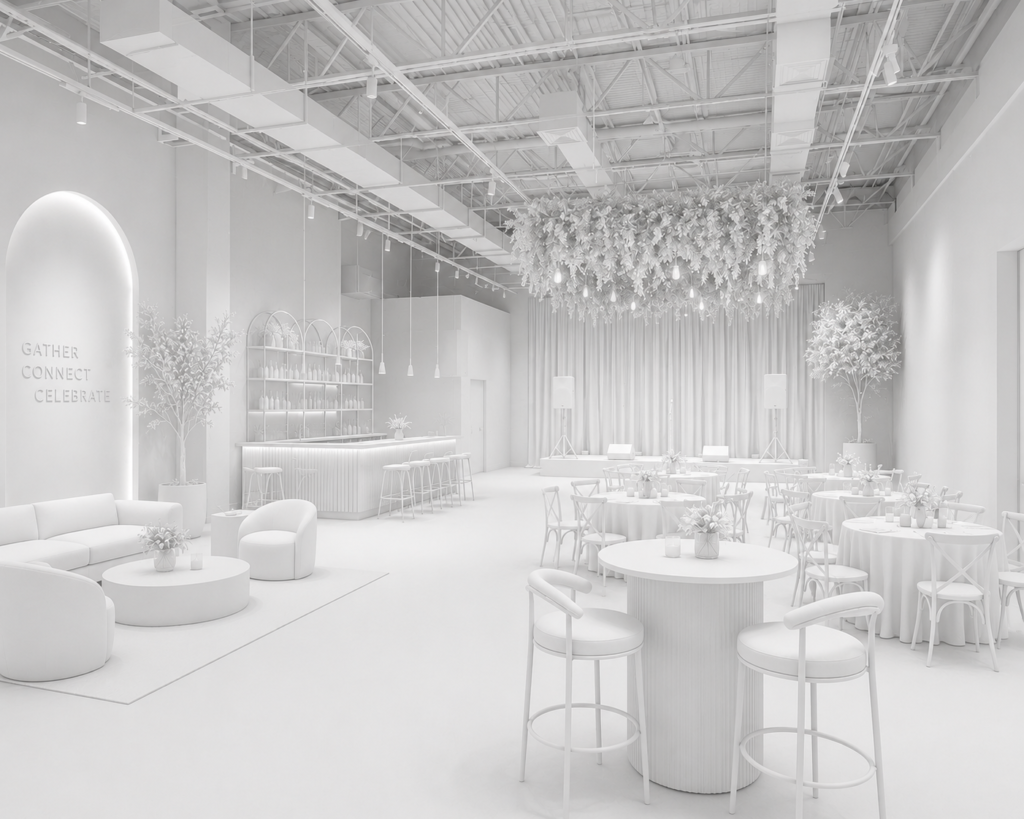
For example, I was recently working on branding a tent space for a race event, where I needed the environment to feel more immersive and realistic quite early in the process. Normally, that would involve spending a fair amount of time adjusting visuals manually and mocking things up from scratch.
Using AI, I was able to apply designs much more quickly and see how different routes looked in context. It brought the ideas to life much earlier in the process, which made decision-making feel much easier moving forward.
This kind of visual exploration fits quite naturally into how I structure projects more generally, especially in the earlier stages where ideas are still taking shape.

3. Organising Work and Reducing Friction
A lot of creative work isn’t just designing. It’s managing notes, feedback, tasks, and information across different places, which is often where things start to feel slightly fragmented.
This is where AI becomes quietly useful.
I’ve found it helpful for structuring ideas, organising information, and reducing some of the friction that builds up around projects. Not in a dramatic way, but in small moments where something becomes slightly easier.
One idea that came up in a conference recently was that we’re moving towards a more constant process of curation. Not setting a system once and letting it run, but continuously adjusting and refining it as things evolve.
That feels very accurate. AI doesn’t remove that responsibility, it just supports it.
And realistically, that’s probably where I’ve found it most valuable. Not replacing creative thinking, but helping reduce some of the smaller organisational tasks that quietly drain time and attention throughout the day.
4. Small Tasks That Add Up Over Time
Some of the most useful applications of AI aren’t the most obvious ones.
They tend to sit in the smaller, repetitive tasks that quietly take up time throughout a project. Things like restructuring information, organising ideas, generating variations, or making quick adjustments.
Individually, they don’t feel particularly significant. But over time, they add up.
And if AI can reduce that load even slightly, it creates more space for the parts of the work that actually require your attention.
Especially when you’re balancing multiple projects at once, those small time savings become much more noticeable.
Where AI Doesn’t Help (As Much As You Might Expect)
It’s easy to focus on what AI can do, but it’s just as important to understand where it falls short.
One of the points that came up in a talk was around the quality of inputs. AI only works as well as the data and direction you give it, which becomes very noticeable in practice.
If the thinking isn’t clear, the output usually isn’t either.
There’s also still something missing when it comes to judgement. AI can generate options, but it doesn’t always understand what makes something feel right within a specific context.
That part still comes from you.
A More Realistic Way to Use AI
I think there’s a temptation to try and use AI for everything, especially with how quickly new tools are being released.
But in practice, that’s usually where it starts to feel less helpful.
The more useful approach, at least for me, has been to use it selectively. In the parts of the workflow where it genuinely saves time or removes friction, rather than trying to build everything around it.
That feels much more sustainable long term, especially within creative work where so much still depends on judgement, taste, and understanding the bigger picture around a project.
Final Thoughts
AI has become part of my workflow, but not in a way that feels overwhelming or all-consuming.
It sits around the work, supporting certain stages and making small parts of the process easier to manage. That’s usually enough.
Because at the centre of it, the work is still the work. The ideas, the decisions, and the judgement still come from you.
If you’re exploring this further, I’ve also written about the best AI tools for designers and how I organise my creative workflow, which show how these tools fit into a wider creative system.
Leave a Reply